By Orch8 Engineering · Editorial policy
Cron vs Job Queue vs Durable Workflow Engine: Choose the Smallest Tool That Works
Use cron for one short, repeatable task on a known schedule. Use a job queue when many independent tasks need concurrency, retries, or backpressure. Use a durable workflow engine when steps depend on prior state, may wait for hours or days, or must recover without repeating completed effects. Do not start with orchestration by default.
What is the practical answer?
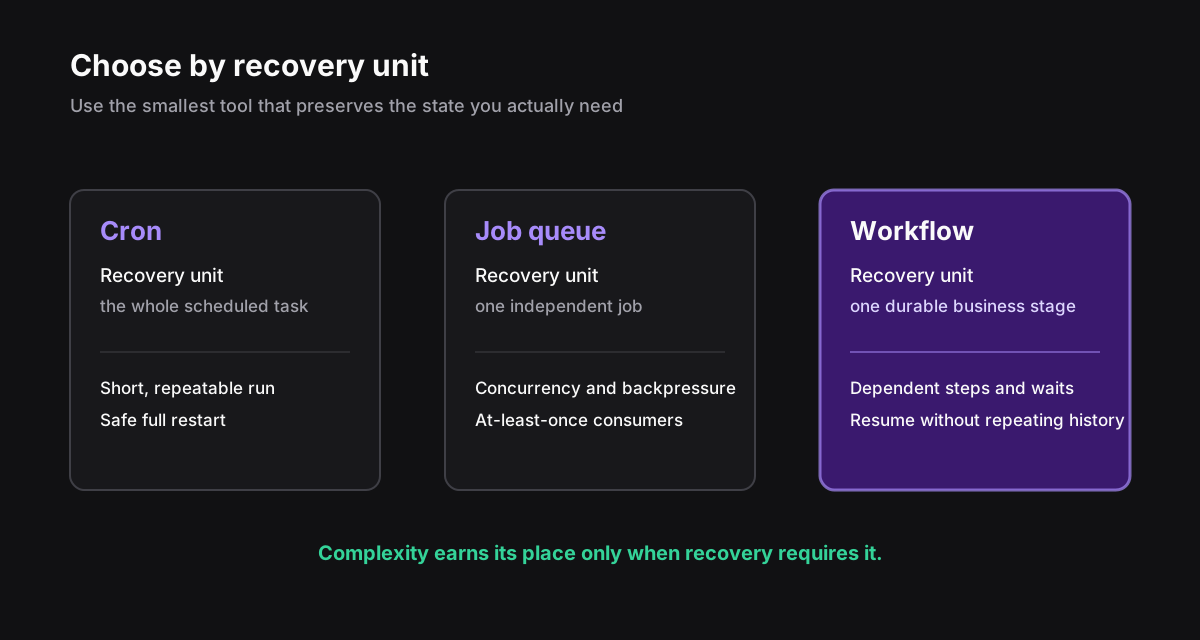
Cron, job queues, and durable workflow engines solve different recovery problems. Use cron when one short scheduled task can safely restart from the beginning and needs only overlap protection, a timeout, logs, and a missing-success alert. Use a job queue when many independent tasks require concurrency, retries, or backpressure; every consumer should remain safe under at-least-once delivery. Use a durable workflow engine when one business process has dependent stages, waits across deployments or human response time, or contains external effects that cannot be repeated safely. The deciding question is the unit of recovery. If the whole script is the recovery unit, cron may be enough. If each independent item is the unit, use a queue. If a named step and its persisted business state are the unit, orchestration is justified. Start with the smallest sufficient tool, migrate one painful path, and retain simple scheduled jobs rather than forcing every task through one platform.
Evidence: When cron stops being enough · Migration from cron to queues · Why use an orchestrator instead of Python · Warning about building a custom orchestrator
Cron vs job queue vs workflow engine#
The smallest tool is usually the best tool. A nightly cache refresh does not become more reliable because it has a workflow graph. It becomes harder to operate.
Complexity crosses the line when the script starts carrying a second system inside it: overlap locks, retry schedules, per-step status, backfills, approval state, deduplication, and a dashboard to explain what happened.
| Need | Cron | Job queue | Durable workflow |
|---|---|---|---|
| One task on a schedule | Best fit | Possible | Usually too much |
| Throughput and backpressure | Poor fit | Best fit | Possible |
| Multi-step state and branching | Hand-built | Application-owned | Best fit |
| Wait days without compute | Awkward | Needs extra state | Built for it |
| Resume after crash | Script-owned | Retry the job | Resume durable boundary |
| Human approval | Database glue | Database glue | Workflow state |
Stay with cron while the job is one unit#
Cron gets unfairly dismissed. It is inspectable, widely understood, and almost free. Keep it when the unit of recovery is the whole script. Add a timeout, an overlap policy, structured logs, and an alert for missing success—not a platform migration.
- The whole run finishes inside a predictable window.
- Running it twice is safe, or overlap is prevented with one lock.
- A failed run can restart from the beginning without customer harm.
- Logs plus one success/failure alert are enough to operate it.
Choose a queue when tasks are independent#
A queue earns its place when producers outpace consumers, you need controlled concurrency, or individual jobs need retries. Image resizing, webhook fan-out, and report generation fit cleanly. Each job should carry enough information to run on any worker and be safe under at-least-once delivery.
A chain of jobs can work, but watch where state migrates. If each consumer decides which job comes next, and a database row tracks which stage happened, the application now owns a workflow engine in pieces.
One schedule + one recoverable unit -> cron
Many independent recoverable units -> job queue
One business process with durable stages -> workflow engineUse orchestration when the recovery unit is a step#
Orch8 is one option at this boundary: JSON-defined sequences, persisted snapshots, and plain HTTP or pull workers. It is a poor choice for a two-second stateless job that a queue already handles well. It becomes relevant when the run itself is durable business state.
- A run lasts across deploys, outages, sleep, or human response time.
- Repeating an earlier step can charge, send, or mutate twice.
- Operators need to see the current step and resume deliberately.
- Branching, compensation, rate limits, or child workflows are business behavior.
- Workflow versions must coexist while older runs remain active.
Migrate one painful path, not the whole scheduler#
Pick the job with the most expensive recovery: the one with manual backfills, duplicate side effects, or week-long waits. Document its states and external effects. Put stable identities around those effects. Then move only that path and run failure injection before production traffic.
Leave simple cron tasks alone. Architecture is not a loyalty program; you do not get points for sending every background job through the same system.
Which signals show that a simpler tool is no longer enough?#
A cron task is outgrowing cron when the script accumulates its own overlap lock, retry calendar, per-step status table, backfill interface, approval state, deduplication rules, and dashboard. Any one feature may be reasonable; together they indicate that the application is implementing orchestration implicitly. Write down the states and transitions before choosing a replacement. The diagram often reveals whether the real need is merely a queue or a durable business process.
A queue is outgrowing independent-job semantics when consumers coordinate by writing which job should happen next, operators must resume from the middle, or a completed earlier job cannot safely repeat. Chaining jobs is not inherently wrong. The warning sign is that the chain’s business state lives across queue messages, ad hoc database rows, and consumer code without one authoritative execution record.
Do not migrate because a tool feels unfashionable. Migrate when recovery work, customer harm, or operational ambiguity exceeds the cost of a stronger execution model. Estimate engineer hours spent on backfills and incidents, the cost of duplicate effects, and the delay caused by not knowing which stage is active.
| Observed workaround | Underlying need | Likely next step |
|---|---|---|
| One overlap lock | Prevent concurrent schedule runs | Keep cron |
| Large independent backlog | Backpressure and concurrency | Add a queue |
| Per-step resume table | Durable staged recovery | Evaluate workflow engine |
| Approval row and poller | Long durable wait | Evaluate workflow engine |
What operating cost does each option introduce?#
Cron has low platform cost but places recovery inside the script. You need a scheduler owner, missing-run alert, timeout, overlap policy, logs, and a backfill method. Host-local cron also couples work to one machine; managed schedulers reduce that risk but do not add per-step durability.
A queue adds broker or service operations, worker autoscaling, poison-message handling, retry and dead-letter policies, queue-age monitoring, and idempotent consumers. It pays for itself when producers and consumers need to run at different rates or when work can be partitioned into independent units. A queue does not automatically explain a business process spanning several jobs.
A workflow engine adds persistent execution storage, timers, worker routing, version compatibility, migrations, visibility, and control operations. Managed products shift some infrastructure work to a vendor; self-hosting retains database, backups, upgrades, capacity, and on-call ownership. Include those costs and the learning model, not only license price.
- Count infrastructure and on-call ownership over three years.
- Count application code removed or avoided: locks, retry state, approval polling, and backfill tooling.
- Count migration and exit work, including stored-state export and worker protocol coupling.
- Count operator time to diagnose and recover the most expensive incident.
- Count customer-impact risk from duplicates, missed schedules, and opaque partial completion.
How can one workload migrate without a flag day?#
Choose one process whose recovery is already painful and define a stable external command at its entry. Keep the old scheduler as producer initially, but have it create one workflow or queue job using a deterministic migration key. Prevent both old and new paths from executing the same business effect. Shadow-read state or run effect-free validations before moving live writes.
For a cron-to-queue move, extract one independent item per job and preserve the original batch ID for backfills and reporting. For a queue-to-workflow move, map the existing stage row and job chain to explicit workflow states. Import only enough active state to continue safely; completed historical jobs can remain in the old system under retention.
Canary by tenant, job type, or deterministic percentage. Compare completion latency, retries, operator interventions, and duplicate-prevention conflicts. Keep rollback directional: stop new admissions to the candidate, let owned work drain or checkpoint, then restore the prior producer. Avoid copying partially completed state backward unless a tested transformation exists.
intent_id = billing-cycle:2026-08:tenant-42
if assignment(intent_id) == workflow:
start_workflow(idempotency_key=intent_id)
else:
enqueue_legacy_job(idempotency_key=intent_id)A 45-minute selection workshop#
Bring the engineer who owns the job, an operator who has recovered it, and the product owner who understands customer consequences. Draw the happy path and three failures: process death, an ambiguous external response, and a deployment while work is active. Mark the smallest unit that must resume without repeating earlier effects.
Score cron, queue, and workflow approaches on correctness, operational visibility, team familiarity, recovery steps, infrastructure ownership, versioning, and exit cost. Reject any option that cannot meet a non-negotiable safety condition. For the remaining choices, prototype the hardest failure rather than the easiest happy path.
Record the decision and its reversal trigger. A team may choose a queue now and state that human waits or three dependent stages will trigger reevaluation. This prevents both premature orchestration and endless growth of accidental workflow code.
Sources and further reading
Official references support technical claims; community discussions are used only as problem signals.