By Orch8 Engineering · Editorial policy
Human-in-the-Loop Workflow Architecture for Safe Approvals
A human approval should be a durable wait, not a sleeping worker or polling loop. Persist the request and allowed decisions, notify the reviewer, authenticate and authorize the response, make duplicate submissions idempotent, record who decided and when, and define timeout, escalation, and rejection paths.
What is the practical answer?
Human-in-the-loop workflow architecture treats approval as a durable, authorized state transition rather than a sleeping worker or informal message. Persist the approval ID, workflow and definition version, subject, payload digest, allowed choices, reviewer policy, creation time, and deadline. Notify the reviewer, then bind the response to an authenticated identity and that specific pending approval. Reject expired, malformed, unauthorized, or already-consumed decisions, and return the original result for an idempotent duplicate. Design explicit branches for approval, rejection, timeout, and escalation, with audit evidence showing who decided, when, under which policy, and why when a reason is required. The interface should explain the exact object and consequence being approved while avoiding secret exposure. A Slack reaction or emailed link is not authorization by itself. The workflow engine can retain the wait and resume on a valid signal; the application still owns identity, authorization, notification delivery, and decision-interface quality.
Evidence: NIST AI RMF Playbook · OWASP: transaction authorization
Make the decision a first-class state#
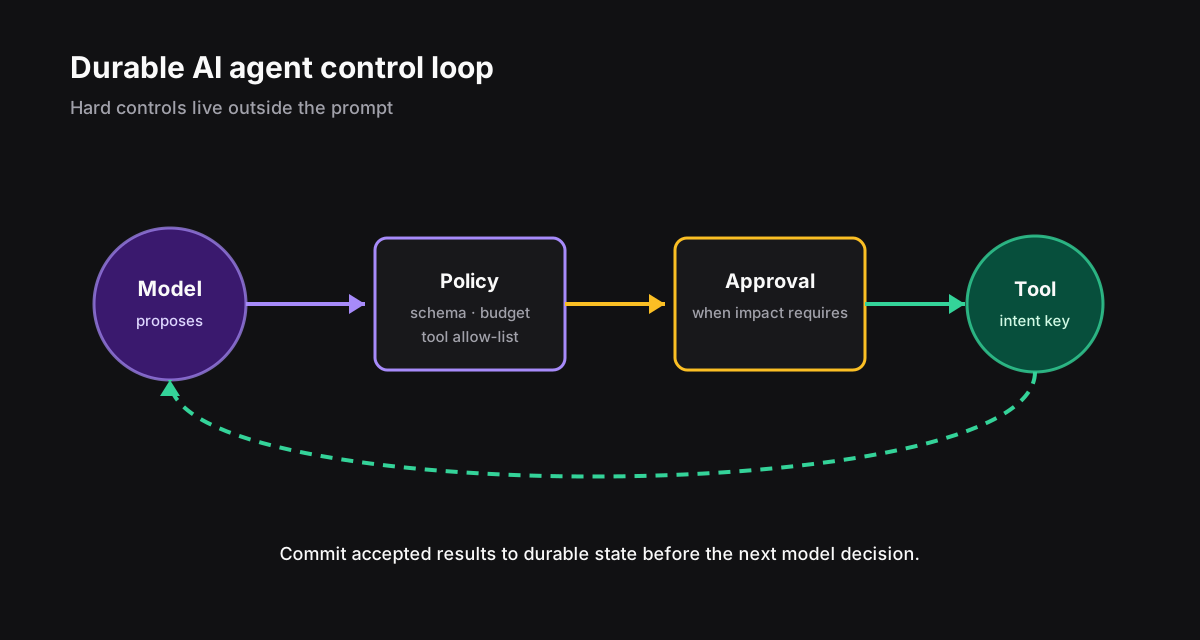
Store the approval ID, workflow version, subject, allowed choices, reviewer policy, creation time, deadline, and payload digest. The worker can release compute while the engine waits.
The response is a command against that exact approval, not a generic resume button. Reject expired, unauthorized, malformed, or already-consumed responses.
Design every exit path#
| Event | Required behavior | Audit evidence |
|---|---|---|
| Approve | Continue declared branch | Identity, time, decision |
| Reject | Follow explicit branch | Reason and policy |
| Timeout | Escalate or close | Deadline and action |
| Duplicate | Return prior result | Original decision ID |
| Definition changes | Honor pinned contract | Workflow version |
Give reviewers enough context, not unlimited power#
Orch8 signals can resume a durable approval boundary. Your application still owns reviewer identity, authorization, notification delivery, and the quality of the decision interface.
- Show the exact object and consequence being approved.
- Link to evidence without leaking secrets.
- Use constrained choices and require a reason where appropriate.
- Confirm high-impact decisions with step-up authentication.
- Provide a visible deadline and escalation owner.
What belongs in a durable approval request?#
Persist the exact proposed action, target, input or diff digest, requester, reason, risk class, policy version, required approver role, creation time, expiration, and workflow state version. The approver should see a human-readable preview generated from the same immutable payload. If the payload changes, create a new request; approval of an earlier summary must not authorize different arguments.
Assign a stable approval ID and make approve, reject, and expire compare-and-swap transitions. Two clicks or two approvers may race, so only one terminal decision can win for a single-decision policy. For quorum policies, record each independent vote and compute the result from declared rules rather than overwriting one status field.
Separate permission to approve from permission to execute. The workflow verifies the approver's current identity and role, accepts the decision, then dispatches through its ordinary effect safety boundary. An approval is not proof that a provider accepted the action.
| Field | Purpose | Failure prevented |
|---|---|---|
| Action digest | bind decision to exact payload | post-approval mutation |
| State version | bind to current workflow boundary | stale approval |
| Expiry | limit decision lifetime | late execution |
| Approver rule | prove authority | self-approval or wrong role |
How should a workflow wait for a person?#
Commit the workflow into an awaiting-approval state before sending notifications. Store the approval ID and deadline atomically with that transition. Notifications are retryable delivery aids; they are not the source of truth. A lost email must not lose the request, and a duplicated notification must lead to the same approval page.
Use durable timers for reminders and escalation. Model business calendar rules explicitly when deadlines exclude weekends or holidays. When the timer fires, condition the transition on the request still being pending so an approval racing with expiration cannot produce both execution and escalation.
Support reassignment and delegation as audited transitions with policy checks. Show queue ownership, age, deadline, and blocked workflow impact. Avoid exposing sensitive payloads in notification previews; send an authenticated link to the current request and re-check authorization when opened.
- Persist waiting state before notification.
- Make reminder and escalation conditional on pending status.
- Re-check identity, role, tenant, and separation-of-duties rules at decision time.
- Invalidate links and decisions after expiry or payload change.
- Provide accessible keyboard, focus, status, and error behavior.
- Record every view and decision according to privacy policy.
What happens after approval, rejection, or timeout?#
On approval, record the decision and action digest, then create a stable external-effect intent. If the worker dies after dispatch, reconcile that intent rather than requesting approval again or generating a new action ID. On rejection, record a structured reason and choose whether the workflow ends, requests revision, or follows an alternate path.
On expiration, block the old request and follow a declared policy: fail, escalate, auto-resolve only for low-risk cases, or generate a new request from current data. Never silently execute because nobody responded. A new request needs a new ID and may require a fresh preview because prices, permissions, or target state can change during the wait.
Cancellation can race with a human decision. Use state versions so only an allowed transition wins, and display the authoritative result to the losing caller. If execution already crossed an irreversible boundary, cancellation may stop later steps but must not rewrite history. Offer compensation only as a separately authorized command.
accept decision where approval_id = ?
and status = pending
and workflow_state_version = expected
and expires_at > now
then create effect_intent(action_digest)How do you operate and audit human waits?#
Measure pending count and oldest age by risk and owner, decision latency, expiry, reassignment, rejection, escalation, stale-decision conflicts, and time from approval to confirmed effect. Do not rank individuals with context-free speed metrics; delays may reflect workload, policy, or missing information. Use the data to improve routing and request clarity.
The audit record should answer who proposed what, which policy evaluated it, what the approver saw, who decided, when, from which authenticated context, what execution intent followed, and what external receipt confirmed it. Protect this record with retention and access controls appropriate to its sensitivity.
Test duplicate clicks, two approvers racing, expired links, revoked roles, payload changes, notification retries, worker death after approval, ambiguous provider responses, and cancellation races. Include accessibility and mobile tests because approvals often happen away from a desktop.
What makes an approval understandable and accessible?#
Lead with the decision, consequence, and deadline. Show who requested it, the affected resource, material changes, cost or risk, supporting evidence, and what happens after approval or rejection. Put raw JSON and technical history behind progressive disclosure. A person should not approve merely to dismiss an ambiguous notification.
Make approve and reject distinct, keyboard reachable, and resistant to accidental activation. Preserve focus, announce validation and status changes to assistive technology, and never encode the only risk cue in color. On narrow screens, keep the action summary and consequence visible before controls while allowing detailed diffs to scroll safely.
After submission, show the authoritative accepted decision and whether execution is pending or confirmed. Handle races honestly: if another approver, cancellation, or expiration already won, explain that no new decision was applied. Provide a durable receipt and a route back to the workflow rather than leaving users on a spinner.
Test the language with people who hold the real approval role. Measure requests for clarification, reversals, expired decisions, and errors alongside speed. Faster approval is not success when reviewers misunderstand the scope or approve a changed payload.
- Use plain-language action and consequence summaries.
- Display immutable payload identity and expiry.
- Support keyboard, screen reader, zoom, and mobile use.
- Confirm the accepted decision and execution status separately.
Sources and further reading
Official references support technical claims; community discussions are used only as problem signals.