By Orch8 Engineering · Editorial policy
Offline Durable Workflows on iOS and Android
Mobile apps should persist user intent locally, assign a stable operation ID, and sync when the operating system permits. Treat background execution as opportunistic, make uploads resumable and idempotent, reconcile server status after reconnect, and place long-running orchestration on the server rather than assuming the phone will stay awake.
What is the practical answer?
Offline durable mobile workflows divide responsibility between the device and the server. The app should persist the user’s intent locally before showing it as queued, assign a stable operation ID, and sync when iOS or Android permits background work. Reuse that operation ID across network retries, make large uploads resumable, and query server status after an ambiguous response instead of creating another operation. Once the server accepts the intent, return a durable workflow ID and let the device observe progress; do not keep a mobile request open for a process that may run for minutes or days. Treat operating-system schedulers as opportunistic because they do not guarantee immediate or unlimited execution, and provide a foreground resume path for urgent work. Handle account changes and local sensitive data explicitly. Offline-first does not mean device-only: it means the user action survives disconnection, remains attributable to one intent, and converges to a known server outcome.
Evidence: Android Developers: WorkManager · Apple Developer: background tasks
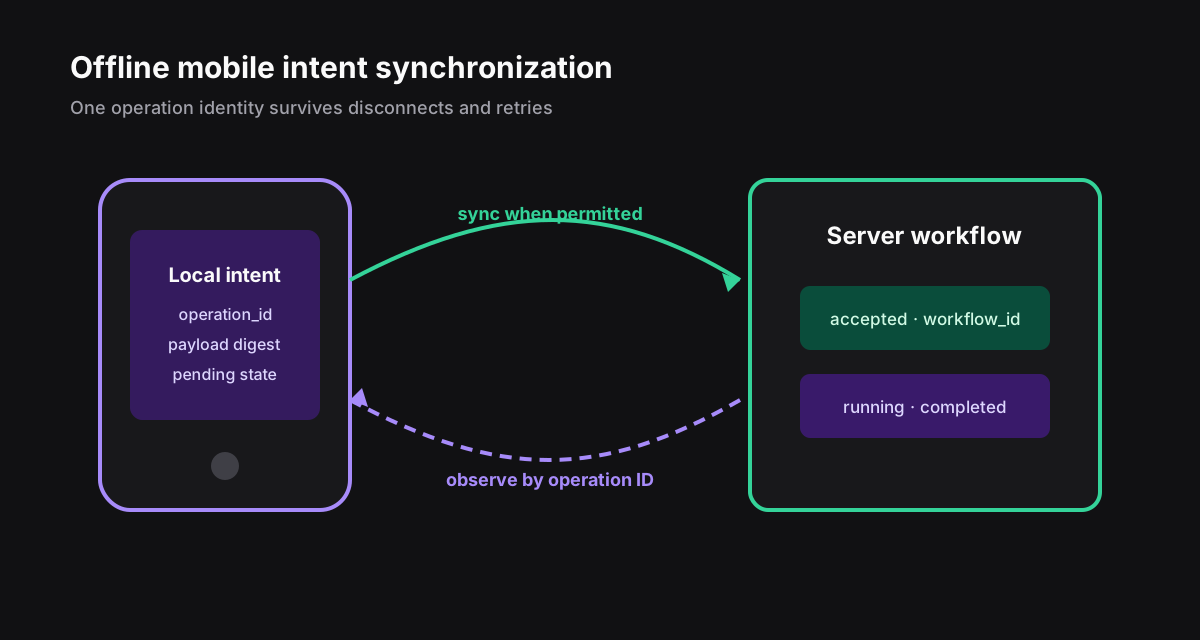
The device owns intent; the server owns the long run#
Persist the user's action and operation ID before showing it as queued. A background scheduler may wake later, be throttled, or never run before the app opens again. Once the server accepts the operation, return a durable workflow ID and let the client observe it.
Do not hold a mobile request open for a multi-minute workflow. Sync acknowledgement and workflow completion are separate states.
Use an explicit sync state machine#
- Reuse one operation ID across network retries.
- Store upload offsets for large media.
- Reconcile by operation ID after an ambiguous response.
- Resolve conflicts using domain rules, not last-write-wins by default.
- Make logout and account switching clear local sensitive state safely.
local_pending -> uploading -> server_accepted
| | |
v v v
needs_user retry_later observing
|
completed / failedRespect platform schedulers#
Use WorkManager for deferrable persistent Android work and Apple's background task APIs for permitted maintenance or processing. Neither platform promises immediate, unlimited execution. Design a foreground resume path for urgent or user-visible work.
Orch8's mobile boundary can begin when the server accepts the intent. Keep authentication short-lived, avoid embedding service credentials, and return compact progress suitable for intermittent connections.
What should the app persist before it loses connectivity?#
Persist user intent as a local command before showing it as safely submitted. Each command needs a stable client-generated ID, account and device context, operation type, schema version, payload or encrypted reference, creation time, dependency IDs, and local status. Retries across app restarts and network changes reuse the same command ID; a new user action receives a new ID.
Separate local draft, queued command, server-accepted command, and completed workflow. These states have different evidence. A checkmark for a local database write must not imply that the server accepted or executed the action. Use clear labels such as Saved on this device, Waiting to sync, Submitted, Needs attention, and Completed.
Protect the outbox with platform storage controls and minimize sensitive payloads. Refresh authorization when sending because a user, role, subscription, or target resource may have changed while offline. A command created with valid access yesterday is not automatically authorized today.
| Client state | Evidence | UI wording |
|---|---|---|
| Draft | local editable record | Saved on this device |
| Queued | immutable command in outbox | Waiting to sync |
| Accepted | server receipt and command ID | Submitted |
| Terminal | workflow result or rejection | Completed or needs attention |
How should the sync protocol handle retries?#
Send commands to an idempotent endpoint keyed by tenant and command ID. The server stores the accepted request digest and returns the same receipt for a duplicate with identical content. If the same ID arrives with a different digest, reject it as an integrity conflict. Do not use a timestamp or HTTP request ID as the business identity.
Upload in dependency order with bounded concurrency. A photo upload may need to finish before a report submission that references it, while independent commands can proceed in parallel. Apply exponential backoff with jitter for transient failures, honor server retry guidance, and stop automatic retries for authentication, validation, conflict, or permanent business rejection.
The acknowledgement must distinguish received from completed. Return server command ID, accepted schema version, workflow ID when created, and current status. The client can then poll, subscribe, or refresh by cursor without resending the command merely because final work takes time.
POST /commands
Idempotency-Key: device-command-0187
request_digest: sha256(canonical_payload)
200 duplicate: same receipt
409 conflict: same key, different digest
202 accepted: workflow_id + status_urlWhich conflicts need product rules?#
Optimistic concurrency protects updates to shared records. Include the base server version the user edited. If the record changed while offline, the server rejects or returns a mergeable conflict rather than accepting last-write-wins by default. Safe automatic merge depends on the domain: independent checklist items may merge, but payment amount, inventory allocation, or approval state usually requires review.
Deletions and permissions deserve special handling. A resource may be deleted, archived, transferred, or made read-only before sync. Show the server truth, preserve the user's local work for export or revision, and explain the available action. Never recreate a deleted resource automatically unless the domain explicitly defines that behavior.
Model workflow commands separately from document synchronization. Starting a process, approving an action, or issuing a refund has consequential semantics and stable effect identities. Generic record merge algorithms cannot decide whether those commands should repeat or compensate. Route them through server policy and durable workflow state.
- Declare fields that can merge automatically.
- Use base versions for shared mutable records.
- Reject stale approvals and permission-sensitive commands.
- Preserve rejected local input for review or export.
- Give compensation a new command ID linked to the original.
- Explain conflict resolution in accessible, nontechnical language.
How do background limits change the design?#
Mobile operating systems may suspend or terminate an app immediately after it enters the background. Treat background execution as an optimization, not the durability mechanism. Commit the outbox before attempting network work, use platform background scheduling when available, and resume safely on the next launch or connectivity event.
Keep sync units bounded and resumable. Large uploads use chunk identities and server-side assembly so interruption does not restart gigabytes. Respect battery, data saver, roaming, and user preferences. Do not hold a visual spinner indefinitely when the OS can no longer run the process; show the persisted queued status and last successful sync time.
Handle account changes and device clock drift. Partition or clear queued commands safely on logout according to product policy, encrypt account-bound data, and use server time for expiry and ordering decisions. Local timestamps help the UI but should not authorize a late approval or determine the winner of a distributed write.
| Mobile event | Required behavior | Durable anchor |
|---|---|---|
| App terminated | resume without a new command | local command ID |
| Network switches | retry with backoff | server idempotency receipt |
| Logout | isolate or remove account data | account-bound outbox |
| Clock incorrect | use server deadlines | server timestamp |
Which tests prove offline reliability?#
Automate airplane mode before submit, connection loss during upload, server acceptance with lost response, duplicate client delivery, app termination after local commit, device reboot, token expiry, role revocation, server validation change, and two devices editing the same object. Assert local status, number of accepted commands, workflow outcome, and understandable recovery guidance.
Test storage pressure, corrupted local records, migration from older app schemas, and commands queued across an app upgrade. The app should quarantine data it cannot safely interpret and offer a support or export path. Silent deletion trades a visible error for lost user work.
Measure queued-command age, sync success by network class, duplicate receipt reuse, integrity conflicts, authorization rejection, merge conflicts, time from server acceptance to workflow completion, and manual recovery. Segment by app and schema version so a rollout regression is visible before every user upgrades.
Sources and further reading
Official references support technical claims; community discussions are used only as problem signals.