By Orch8 Engineering · Editorial policy
Trigger.dev vs Temporal for Long-Running Workflows
Trigger.dev fits TypeScript task pipelines that wait for a callback, an approval, or another task. Temporal fits a long-lived process that receives messages throughout its lifetime and coordinates work through Workflow code and Activities. Evaluate both with an approval across a deploy and a provider action whose acknowledgement is lost.
What is the practical answer?
For a long-running approval, Trigger.dev suspends a task on a waitpoint token and resumes it after completion. A waitpoint deadline is separate from the compute time budget. Temporal keeps workflow state in Event History and can accept Signals or Updates while it waits on a condition and a durable timer. A Trigger.dev run locks to the task version at start. A Temporal Pinned Workflow stays on its Worker Deployment Version, and Auto-Upgrade needs code compatible with recorded history. Test both by deploying a new version with one approval pending, then submit decisions to the old and new runs. Next simulate a provider that commits an approved change and drops the acknowledgement. Reuse one provider operation ID across retries and verify the receipt. Count duplicate outcomes and the steps needed to diagnose a stuck execution before choosing a tool.
Evidence: Trigger.dev waitpoint tokens · Trigger.dev run duration · Trigger.dev version locking · Temporal Workflow message passing · Temporal Activity retry behavior · Temporal Worker Versioning · Temporal Workflow Execution
Model the same agent approval in both systems#
An agent drafts a proposed account change. A reviewer has two days to approve, edit, or reject it. The application may receive a cancellation before the reviewer answers. If the change is approved, an external provider applies it and returns a receipt. Use this process to separate how you wait from how you preserve the decision and recover the provider write.
In Trigger.dev, a task can wait for a waitpoint token with a deadline. Your application links the pending approval to the run and authorizes the callback. In Temporal, the workflow can store the proposal, wait on a condition with a durable timer, and use a Signal or Update to handle a decision. A Query can read the current state. Encode the winner when approval, cancellation, and expiry arrive close together.
| Decision | Trigger.dev | Temporal |
|---|---|---|
| Approval or callback | Complete a waitpoint token and resume the task. | Send a Signal or Update to the Workflow ID and handle it in workflow code. |
| Elapsed time and compute | Set a waitpoint deadline separately from the run's compute budget. | Set an approval timer separately from Activity timeouts and any Workflow Execution Timeout. |
| Retry a provider write | Give the write its own task and configure retry behavior. | Put the write in an Activity with an explicit timeout and Retry Policy. |
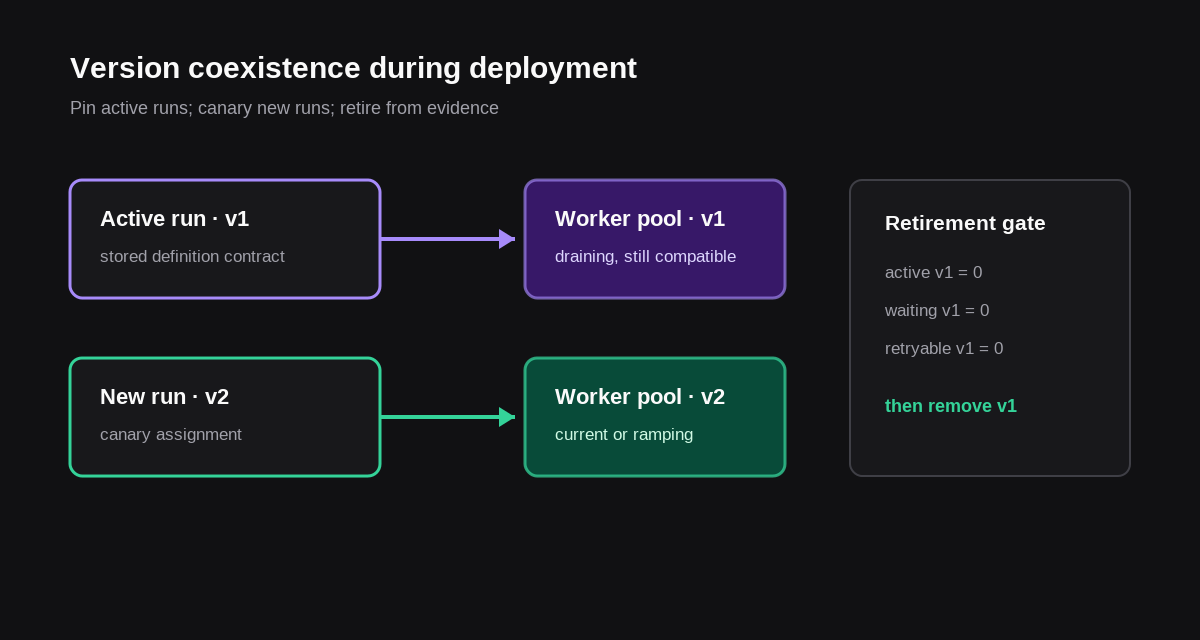
| Deploy during the wait | A run locks to its task version when it starts. A dashboard replay starts a new run using the latest version. | Pinned Workflows use one Worker Deployment Version. Auto-Upgrade requires compatibility with existing histories. |
Deploy while the approval is still pending#
Start a run under version one. Deploy version two with a changed approval payload and start a second run. Submit a decision to each. Check that the application routes old approvals to the original contract and that the new run uses the new one. Include a delayed start in Trigger.dev, since its version is chosen when it begins executing. Test a waited child task and a separately triggered child if your design uses both.
With Temporal, exercise your chosen Worker Versioning behavior. Keep the pinned deployment available for active runs. For Auto-Upgrade, replay representative histories against the new Worker before sending production work to it. For a process that stays open and accumulates many interactions, include history growth in the design and test how Continue-As-New carries forward the needed state.
Lose the provider acknowledgement on purpose#
Have a test provider commit the approved change and then drop its response. Force the task or Activity to retry. The next attempt should reuse the same business operation ID and recover the original receipt. If the provider cannot confirm the result, expose the ambiguous outcome to operators before a second dispatch.
Record the approved input, decision ID, provider operation ID, and receipt. Check that a duplicate approval or a retry after cancellation cannot apply another change. Both engines coordinate their own state. The provider still needs an idempotency or reconciliation contract.
Choose based on the state your application needs#
Try Trigger.dev first if the app already owns the review record and each run mainly needs to wait for a result and continue a TypeScript task pipeline. Track how much application code you need to handle cancellation, status, and version skew.
Try Temporal first if the process itself needs a durable identity with repeated messages, independent Activity retries, and a state that other services query. Track the work required to operate Workers and keep code compatible through upgrades.
Score both prototypes on time to diagnose the stopped run, duplicate provider actions, support for the required waits, and what an operator must do when a run spans a release. Orch8 publishes this comparison and uses a third model with JSON workflow definitions and persisted snapshots.
Sources and further reading
Official references support technical claims; community discussions are used only as problem signals.