By Orch8 Engineering · Editorial policy
Why a Workflow Is Stuck in Running: A Worker-Polling Diagnostic Checklist
A workflow usually stays in running because the expected worker is not polling the right queue, lost its lease, stopped heartbeating, or completed an external call without acknowledging the task. Start with the task record and queue name, then trace worker liveness, lease ownership, process health, and the external effect in that order.
What is the practical answer?
A workflow stuck in running should be diagnosed from its durable task record outward, not from random pod logs inward. First capture the workflow ID, task ID, handler, queue, attempt, lease owner, lease expiry, and last heartbeat. A task never claimed usually indicates queue routing, worker registration, credentials, or a missing handler. A claimed task without heartbeats points to worker death, network loss, or an expired process. Continuing heartbeats with no completion usually indicate a blocked handler or slow dependency. If an external provider completed but the task did not, reconcile the effect before requeueing it. Monitor oldest pending age, time since worker poll, heartbeat age, lease conflicts, and unknown external outcomes because silent stalls may produce no error count. Recover through the engine’s control surface so lease and audit invariants remain intact, then add the missing signal or failure test before closing the incident.
Evidence: Temporal incident: task queue goes silent · n8n report: work remains queued without useful logs · SaaS incident: background jobs failed silently for days
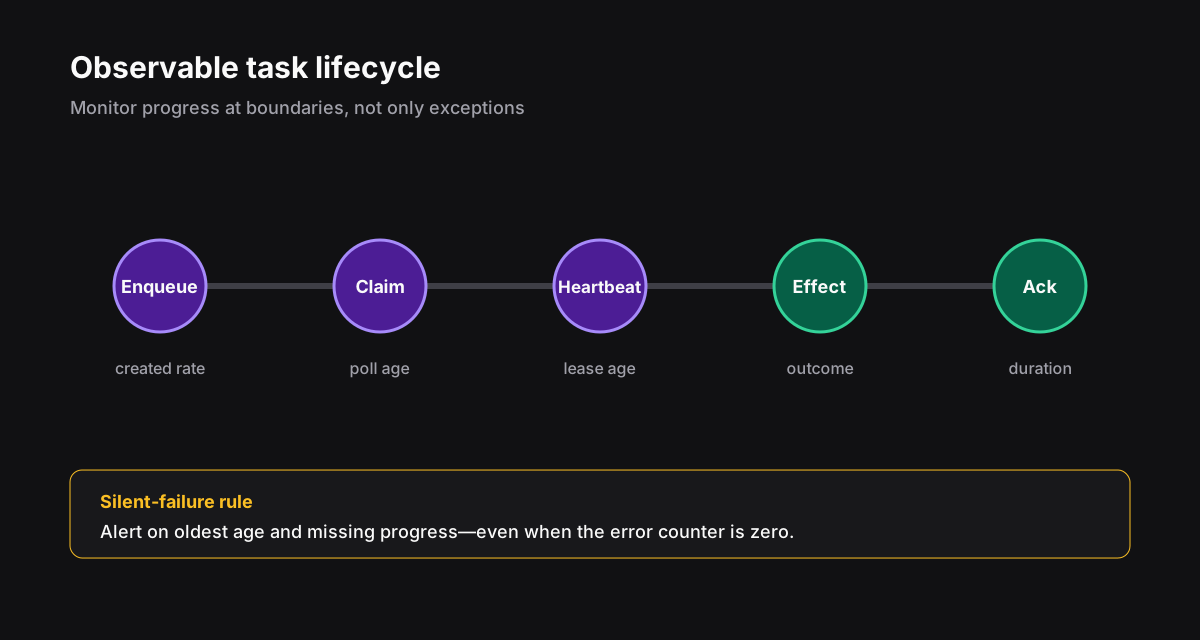
Start with the task record, not the pod logs#
A green deployment does not prove that a worker can receive this task. Write down the instance ID, block or task ID, handler, queue, state, attempt, lease owner, lease expiry, and last heartbeat. Without that row, log searching turns into archaeology.
| Observed state | Likely boundary | First check |
|---|---|---|
| Pending, never claimed | Routing or registration | Does a live worker poll this exact queue and handler? |
| Claimed, no heartbeat | Worker process or network | Is the lease owner alive and is its clock sane? |
| Heartbeats continue | Handler or dependency | Which operation is in progress and what timeout applies? |
| Provider completed, task running | Acknowledgement path | Was completion rejected after lease loss? |
| Repeated lease expiry | Capacity or duration | OOM, shutdown grace, heartbeat interval, and load |
Follow the polling decision tree#
With Orch8's pull-worker protocol, workers poll for handlers they serve and heartbeat long tasks. A stale owner receives a conflict instead of overwriting the current lease. That protects task state, but the handler must treat lease loss as a stop signal.
- No worker registration: check startup, credentials, tenant, and engine address.
- Worker registered on another queue: fix the route or poll the task's exact queue.
- Worker alive but handler absent: deploy the expected handler version.
- Task leased to a dead worker: wait for expiry or use the documented requeue operation.
- Worker crash-loops: inspect the previous termination reason, memory, and shutdown grace.
- Heartbeat returns conflict: the process no longer owns the lease and must stop committing.
- External outcome unknown: reconcile before retrying, especially for payments and sends.
Instrument the boundaries operators need#
Alert on age, not only failure count. A task that never changes state may never increment a failure metric. Pair every alert with the instance ID, task ID, handler, queue, lease owner, and a link to the run record.
Set the threshold from the expected handler duration. Five minutes may be alarming for webhook validation and normal for a model run. One global stuck threshold is easy to configure and almost useless.
pending_age_seconds{queue,handler}
claimed_without_heartbeat_total{queue,handler}
worker_last_poll_seconds{worker,queue}
lease_conflict_total{worker,handler}
task_duration_seconds{handler,status}
unknown_external_effects{provider,operation}Recover without erasing evidence#
Drain unhealthy workers, preserve the execution record, and requeue only after deciding what happened outside the engine. If the task has checkpoints, resume from the last accepted checkpoint. If an external call may have succeeded, reconcile it first.
The incident is over when the run completes and the blind spot is removed. Add the missing queue label, heartbeat alarm, lease-conflict log, or shutdown test before closing the ticket.
How do you isolate the failing boundary?#
Treat running as a claim that must be supported by evidence. First identify the authoritative task row and record its queue, handler, attempt, lease owner, lease epoch, expiry, and last heartbeat. Then ask one question at a time: was work made eligible, did a worker poll the exact queue, did that worker receive this task, does it still own the current lease, and did the completion acknowledgement commit? This order prevents healthy pod logs from distracting you from a routing or state problem.
Compare timestamps on one clock. Queue age measures time since eligibility; schedule lag measures time between expected and actual creation; start latency measures eligibility to lease; heartbeat age measures liveness after start. A task can have low queue age and still be stuck in a handler, or high queue age without ever reaching a worker. Put these measurements beside the state instead of inferring them from a generic running label.
For every transition, find a durable identifier in both engine records and worker logs. Instance ID alone is often too broad; include task ID, attempt, lease token, worker identity, and deployment version. If a log line cannot be joined to the task row, it is weak diagnostic evidence. Correlation fields should be structured and indexed before the incident.
| Last proven boundary | Most likely class | Next evidence |
|---|---|---|
| Eligible, never leased | queue, routing, or capacity | poller counts and oldest age by queue |
| Leased, no heartbeat | process death or blocked runtime | worker lifecycle and lease expiry |
| Heartbeating | slow or blocked handler | stage spans and dependency timing |
| Completion sent, state unchanged | stale lease or commit failure | ack response and state version |
What proves a worker can execute this task?#
A ready endpoint proves that a process responds, not that it polls the required queue. Verify the registered handler name and version, effective queue after environment prefixes, tenant or shard assignment, credentials, network path, and long-poll response. During a rollout, compare old and new workers separately; a small healthy cohort may hide that the only compatible version has drained.
Inspect capacity at the worker, queue, and dependency layers. A worker can poll while all execution slots are occupied, the event loop is blocked, a database pool is exhausted, or a downstream rate limiter holds every task. Report active slots, pending local work, poll successes, empty polls, handler starts, and blocked duration. CPU and memory alone do not explain admission.
Run a harmless synthetic task through the same namespace, queue, permissions, and handler registration. Give it a unique correlation ID and assert creation, lease, heartbeat, and completion. A synthetic task on a default queue does not validate a production queue with different routing. Keep the check low volume and ensure it cannot call a real provider.
- Confirm exact queue and namespace strings after configuration expansion.
- Compare registered handlers with the task's required handler and version.
- Inspect available execution slots and dependency pool saturation.
- Trace one synthetic task through every durable transition.
- Verify graceful shutdown stops polling before lease ownership is abandoned.
How do you recover without duplicating work?#
Do not immediately requeue a running task. Determine whether the current lease is valid and whether the handler may have crossed an external-effect boundary. If no dispatch occurred and the lease expired, a guarded retry can create a new attempt. If a payment, message, or publication may have been accepted, move to unknown-effect reconciliation and reuse the original business intent key.
A force-complete control should require evidence of the result, record the operator and reason, and apply the same state-version checks as worker completion. A cancel control should distinguish request from acknowledgement: an uncooperative process may continue after cancellation was requested. Compensation is a new auditable command, not deletion of the original history.
After recovery, preserve the task row, lease history, logs, and provider receipt long enough for review. Record the exact boundary that failed and the detection gap. Fix the narrow cause—routing drift, shutdown order, heartbeat starvation, missing timeout—then reproduce it with a failure-injection test.
Which alerts catch the problem before a customer does?#
Alert on age and absence, not only error count. Useful signals include oldest eligible task by queue, schedule creation lag, tasks with expired leases, heartbeat age above the handler budget, completion conflicts, and workflows with no state transition inside their expected stage window. Segment by queue, handler, version, and tenant so one cold route is not averaged away.
Set thresholds from service expectations and handler behavior. A two-hour export and a 300-millisecond webhook cannot share a stuck threshold. Use a warning that prompts investigation and a critical threshold tied to user impact. Pair every alert with the task query, dashboard, ownership, and guarded recovery runbook; an unactionable page only moves the outage to the operator.
Track time to detect, time to identify the boundary, time to safe recovery, and recurrence. Review false positives and silent incidents monthly. The goal is not a perfectly green dashboard; it is fast, evidence-based recovery without repeating customer-visible effects.
Sources and further reading
Official references support technical claims; community discussions are used only as problem signals.